Your book, with its evidence
Positions, exposure and reconciliation against broker statements. Stale or missing data stays labelled, never filled in.
Open source · Go
Portfolio, risk and order tools for Interactive Brokers.
Canary connects to your broker, reads your book and the market, checks your risk rules every minute and drafts the protection they call for. Your shell, AI assistant and phone all read the same figures.
Latest release and release notes →
Read-only MCP tools · Signed releases · No telemetry · MIT licence
Canary CLI is the broker engine. Canary Desk adds the schedule, the AI analyst and the console on top. Works with Interactive Brokers through IB Gateway or TWS.
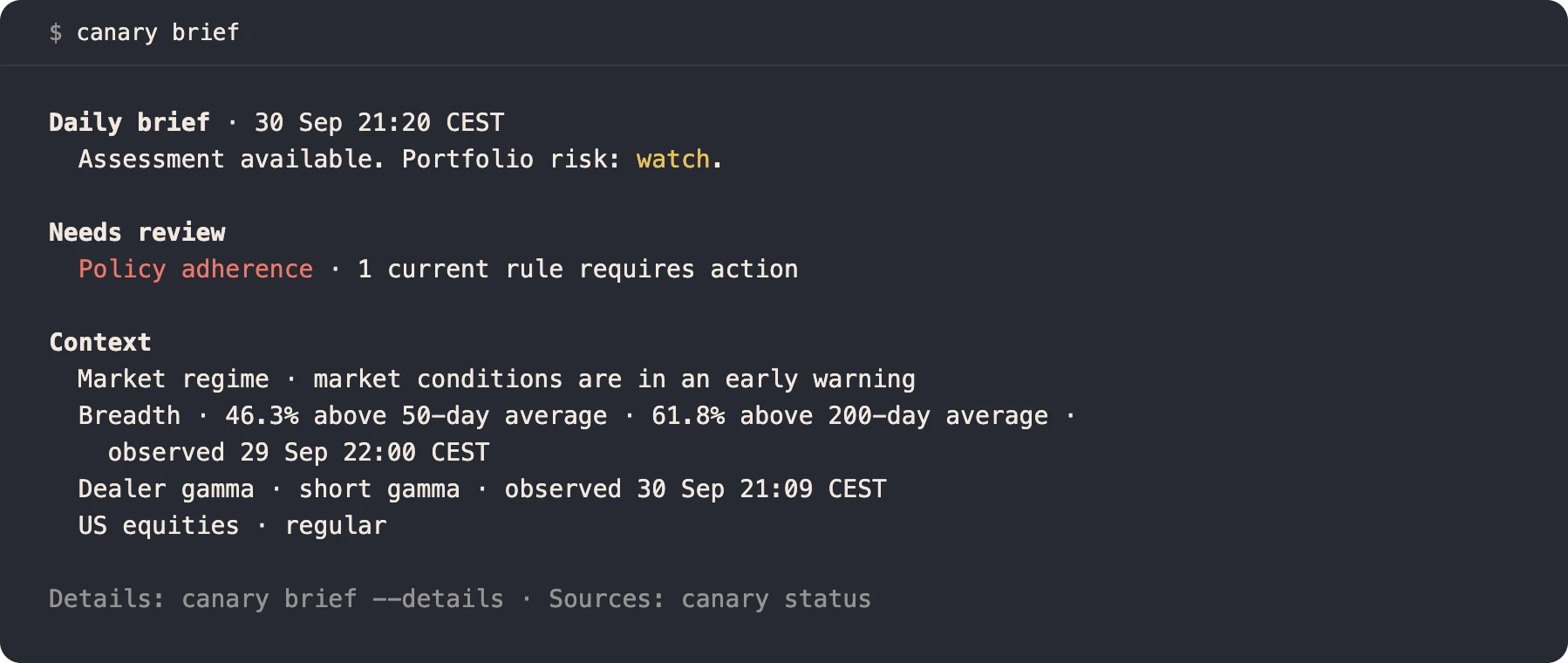
canary brief, the morning read.Synthetic accountPositions, exposure and reconciliation against broker statements. Stale or missing data stays labelled, never filled in.
Regime, breadth, stress, calendars and market events, each with its source and its age.
A rulebook checks the book every minute. When a rule trips, Canary drafts the stop, exit or budget cut it calls for.
The opt-in trading edition sends the orders you confirm or pre-authorise by rule, and shrinks or cancels its own stops when you hold fewer shares. Standard downloads are read-only.
Get started
Run IB Gateway 10.37+ or TWS on the same machine. You need an IBKR Pro account with TWS API access; IBKR Lite does not include it.
Every release ships signed checksums, and the installer checks them against a pinned key. Canary sends no telemetry.
Claude Desktop installcurl -fsSL https://raw.githubusercontent.com/osauer/canary/main/install.sh | sh
canary status # which gateway and account it reached
canary brief # what needs attention today
# Claude Desktop
canary setup claude-desktop
# Claude Code plugin
/plugin marketplace add osauer/canary
/plugin install canary@canary
# then ask:
# "How does my IBKR account look today?"Before you start
Canary works with Interactive Brokers through a local TWS or IB Gateway session. Market data depends on your IBKR subscriptions.
Yes, through the optional trading build and its approval checks. Standard downloads and all MCP tools are read-only. See the order guide.
Version 3.21.0 includes 10.50 compatibility fixes. Live checks passed on TWS; Gateway 10.50 still needs end-to-end validation. See the compatibility details.
Build on it
A broker API hands an agent raw prices and an order ticket. Canary adds the source and age of each figure and holds every order to your rules. Connect Claude Code with two commands, or build your own agent. Canary Desk is built on it, with agents for briefs and analysis.
MIT-licensed, with every line on GitHub. There is no sign-up and no telemetry.
The read-only boundaryEvidence
A figure Canary cannot confirm is never shown as clean. Sources, age and coverage stay beside the figures, so you and your assistant know what to trust.
From the command line
Each figure names its source and its age. Every command also speaks JSON, for your scripts.
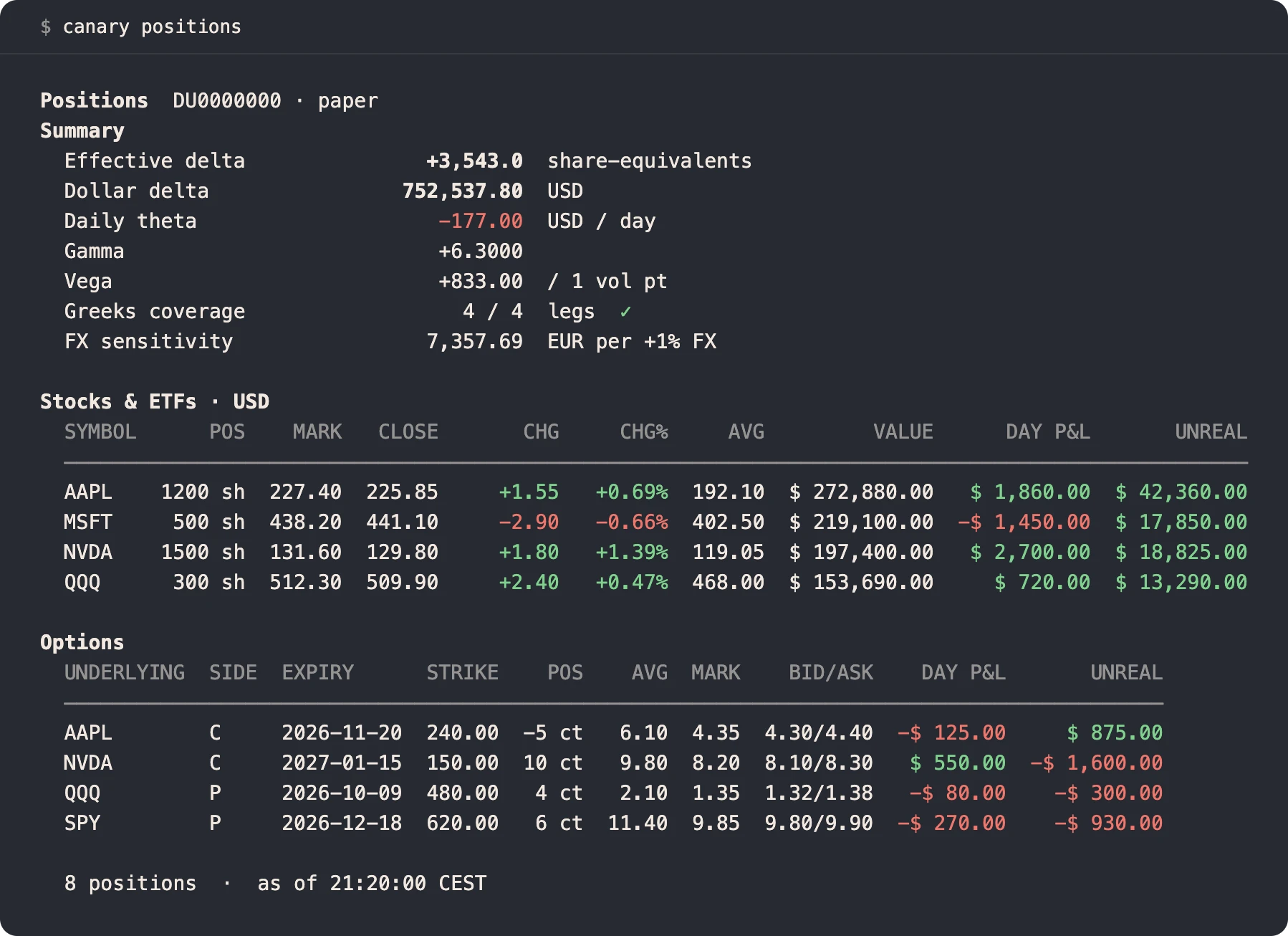
canary positionsSynthetic account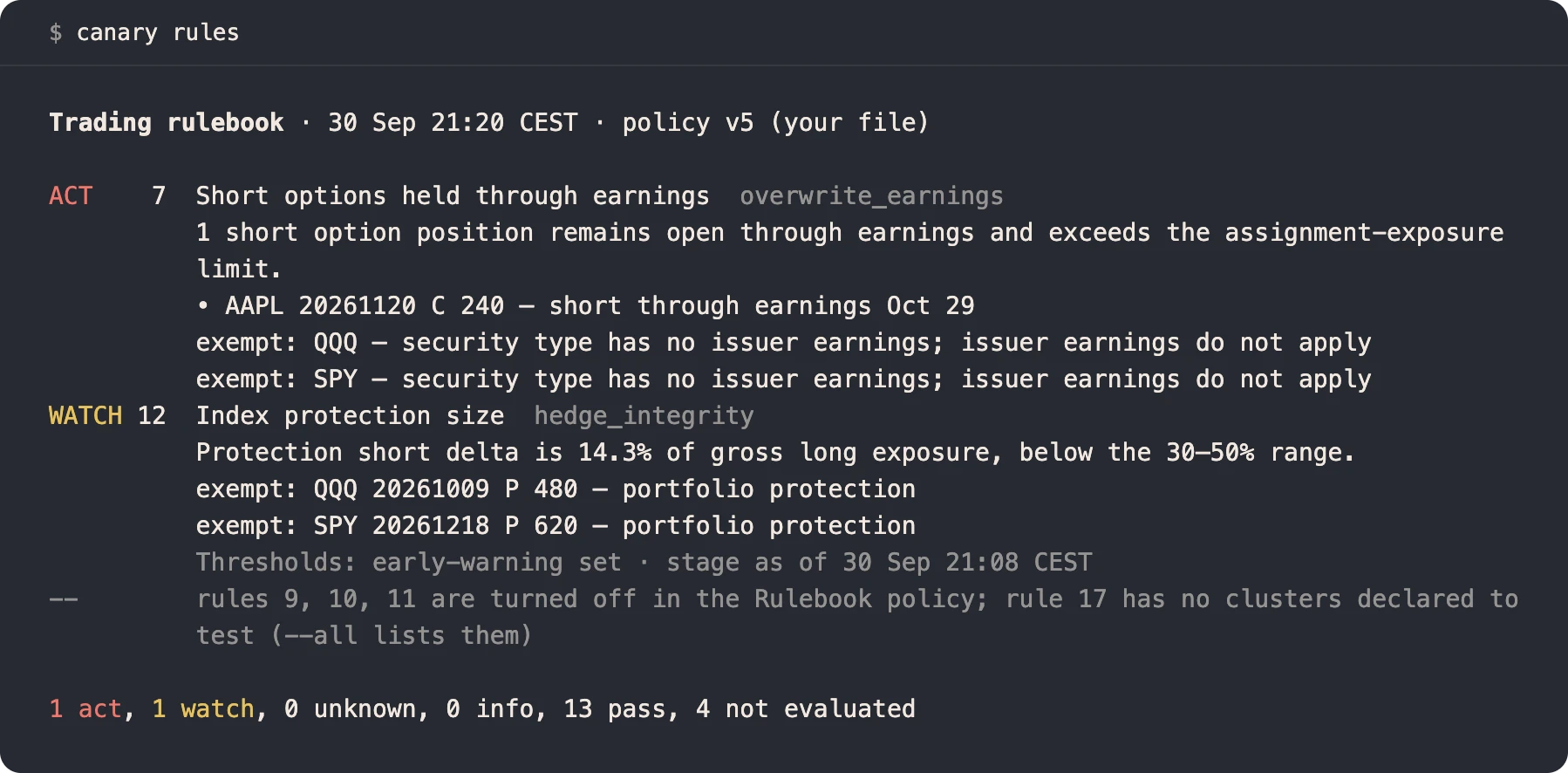
canary rulesSynthetic accountCanary Edge
Edge compares every open, add, trim and exit with leaving the position alone over 1, 5 and 20 sessions. It works from broker records.
It reports what happened. It does not forecast or recommend.
Policy check
Canary acts on numbers you set, from rule thresholds to order sizes and cash reserves. It now prints every one in force with its source and meaning, and reads them against each other and against your account. Each value that does not fit gets a reason and, where one applies, a suggested fix.
Order limits follow the account. The cap on a single order’s value moves with the account’s worth (its net liquidation value), between a floor and a ceiling you set. A temporary larger cap takes one override, which Canary records in its journal.
In trading builds, a protective stop is no longer refused by that cap or by the short-sale check, as long as it sells no more than the stock or ETF you hold, counting your other working sell orders. When you hold fewer shares than one of Canary’s own stops would sell, Canary shrinks or cancels that stop on its own.
The check only reads; you change a limit by editing your files. Stops you placed by hand are never changed, and standard downloads stay read-only.
How the policy check workscanary policy show --explain lists each limit, policy and setting with its value, unit and source. Add a section name to print one part.
canary policy check reads your config, policy files and account against each other, explains each implausible value and suggests a fix where one applies.
canary_policy_check gives MCP clients the same check. It reads and cannot change a limit.
Watchlist and setups
Keep up to 20 US stocks on one watchlist. Canary compares each completed five-minute bar with comparable earlier sessions and reports when unusual volume is followed by a price that holds or rises.
For a setup you want to pursue, it lists the standard calls and reads one dated quote for the exact call you choose. After a fill Canary placed, it checks the entry against later quotes at two points.
Setups are observations, not validated signals. Markouts leave out commissions and never replace account P&L. Watchlist edits change local preferences only, and there are no MCP setup tools.
canary watchlist add NVDA keeps a durable list of up to 20 names. Nothing else changes.
canary setups coverage shows each session’s completed bars, evaluation states and missing data.
canary setups markouts reads the later quotes, and says why any checkpoint was missed.
Borrowing research
Compare borrowing fees, price and liquidity for the stocks you name. Screen IBKR’s US borrowing feed for names that stay expensive, and rank FINRA’s reported short positions by size and days to cover.
Your assistant reads the same results through read-only MCP tools. Filters apply before the result limit, and each row keeps its source date.
Borrowing fees are a cost to borrowers, not a lender’s yield. Short interest comes from a twice-monthly report and does not track live positions. Percentage of free float is not available.
canary lending rates and canary lending market for the symbols you list.
canary lending screen finds borrowing that stays expensive across source dates.
canary short-interest screen with listed-only, price, liquidity and days-to-cover filters.
Cash sweep
Canary plans short-dated government bills for surplus cash in the currency you hold. It keeps commitments and a cash reserve ahead of new purchases, and the reserve now follows the account’s net liquidation value and planned needs.
Before any purchase, the plan shows the bill’s order minimum, the fee bounds and the estimated gain after spread, fees and the cash interest you give up. Each purchase stays between a minimum and a maximum size, so none is too small to earn back its commission. You choose which currency comes first.
Desk shows the plan; Canary checks the cash, bill, price, fees and authority. Each order needs your confirmation or an explicitly pre-authorised sweep with limits and a veto window.
Off by default. Commissioning needs a calibrated policy and current settlement evidence. Bills can lose value if sold before maturity.
Read the sweep controlsSettled cash per currency, current enough to include confirmed trades, after commitments and reserves. While any currency is borrowed, bill buys wait, since a bill would earn less than the margin interest on that loan.
A same-currency bill and its maturity. The broker previews price and fees, and the plan shows the net gain over holding cash.
Confirm the order or use the scoped authority you have granted. Missing evidence holds it.
Statement-backed FX
FX contribution measures how currency moves affect your P&L in the account’s base currency. It covers the day, week, month and year to date, from completed broker statements.
Available in Canary v3.16.0 and in Desk’s private runtime. canary reporting fx --json and canary_reporting_fx return the same result. Missing days stay visible, and an incomplete period shows no total. This is valuation attribution, kept apart from realised Forex lot P&L.
Lending observations
Canary reads managed stock loans and customer net fees from retained IBKR statements. Positions on loan carry a dated annotation, and the fee history expands when you need it.
canary lending fees --json and canary_lending_fees return the same bounded, read-only history. Missing sections, partial periods and a complete record of zero earnings stay distinct.
Available in Canary v3.16.0. Fees stay separate from account P&L, and their link to payouts and P&L is not yet proved. Commissioning an account still needs a populated report.
How lending is reportedArchitecture
The daemon holds the broker connection, the evidence, your rules and the order journal. Everything else is an adapter over the same typed results.
It starts when asked and stops after 15 idle minutes. Status stays responsive while the broker is slow, and after canary stop it stays down until you restart it.
Full features
Go library
pkg/ibkr speaks the TWS wire protocol itself. It needs no vendor SDK and redistributes no Interactive Brokers code.
To read a running Canary from your own program, import the module root. canarytest serves it on a temporary socket for your tests.
cfg := ibkr.DefaultConfig()
cfg.Port = 4002 // Gateway, paper account

conn := ibkr.NewConnector(&ibkr.ConnectorConfig{
    PreferredClientID: 17,
    BaseConfig:        cfg,
})
if err := conn.Start(ctx); err != nil {
    return err
}
defer conn.Stop()

summary, err := conn.RequestAccountSummary(ctx, 5*time.Second)
if err != nil {
    return err
}
fmt.Println(summary.AccountID)
Documentation
Canary Desk is the private workspace built on this engine. See Canary Desk.